The Cost of Vendor Lock-In
May 2026
← NotesAnthropic is outpacing OpenAI on revenue with 98% fewer users. Here is what that tells you about where enterprise AI spending is going, and why the volatility of the last two months deserves more attention than it got.
The Numbers
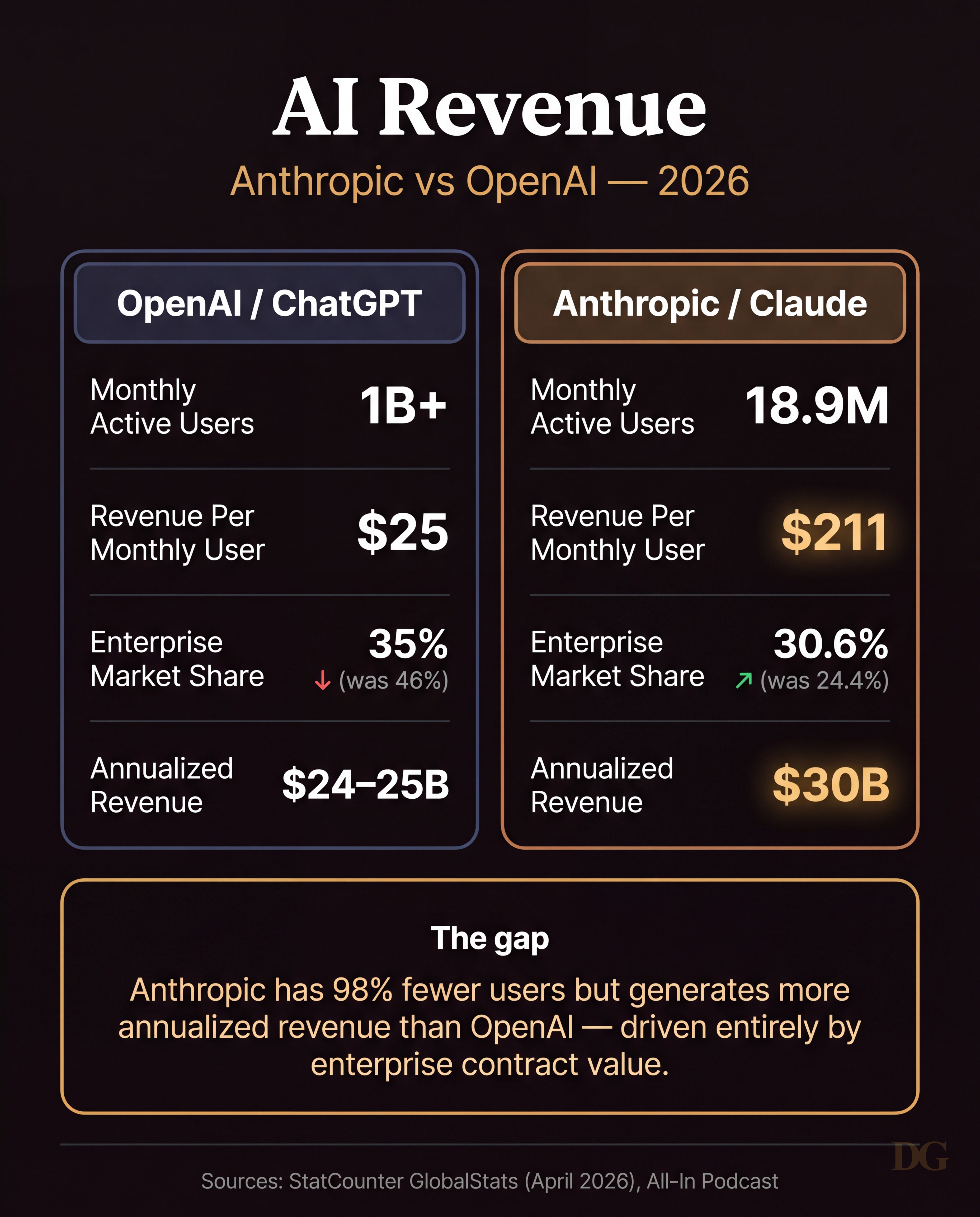
ChatGPT has over one billion monthly active users. Claude sits at around 18.9 million. By raw user count, it is not a competition. But on annualized revenue, Anthropic crossed $30 billion against OpenAI's $24 to $25 billion. The gap comes from one place: enterprise contract value.
Anthropic's revenue per monthly user is around $211. OpenAI's is closer to $25. On enterprise market share, Anthropic grew from 24.4% to 30.6% while OpenAI dropped from 46% to 35.2%. OpenAI still dominates consumer. Enterprise budgets are moving.
What Happened in the Last Two Months
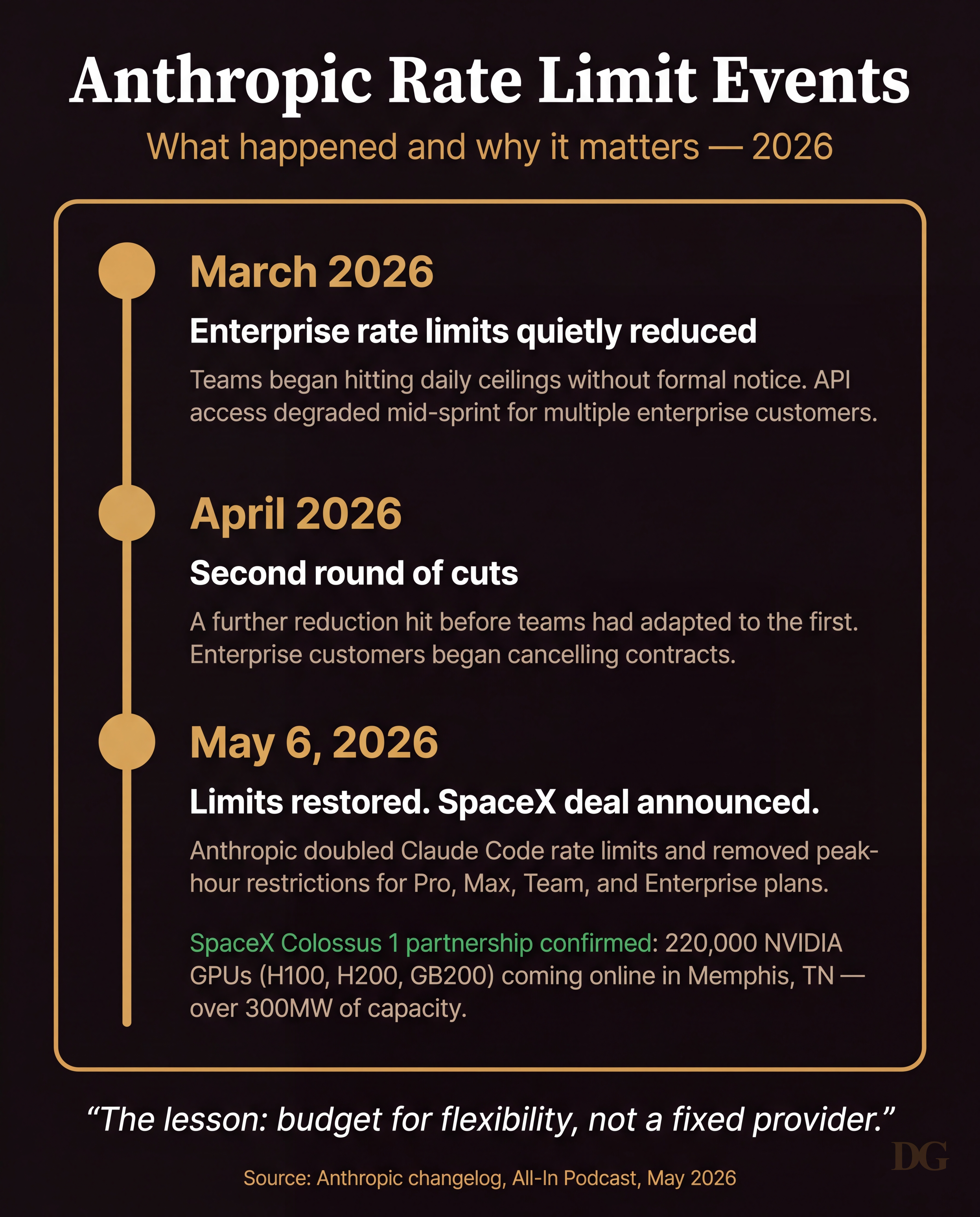
In March 2026, Anthropic quietly reduced enterprise rate limits. No formal announcement, no migration window. Teams started hitting daily ceilings mid-sprint and worked backward to figure out why. In April, a second round of cuts landed before most had adapted to the first. By that point some enterprise customers had already started evaluating alternatives.
On May 6, limits were partially restored. The same day, Anthropic announced a compute deal with SpaceX: exclusive access to Colossus 1 in Memphis, 220,000 NVIDIA GPUs across H100, H200, and GB200 accelerators, over 300 megawatts of capacity. The compute story they needed to hold enterprise accounts arrived the same day the limits came back up.
Some contracts had already walked. In the past two weeks I have seen small and mid-sized teams cancel their Anthropic enterprise subscriptions. The reasoning was consistent: rate limits dropped without notice twice, budgets froze, and the risk of a third round made alternatives look more stable. Restored limits or not, the trust calculus had already shifted.
The Structural Problem
The rate limit volatility exposed something that was already true: most teams had built their AI workflows around a single provider in a way that made switching expensive. Their prompts were tuned to Claude's behavior. Their integrations assumed specific output formats. Their team documentation referenced Claude-specific syntax. When limits dropped, the practical cost of moving was high enough that most stayed and absorbed the disruption rather than migrate.
This is the version of vendor lock-in that does not show up in a procurement review. It accumulates quietly as your team builds habits around a tool. By the time the pricing model or rate structure changes, unwinding it costs more than staying put.
What Engineers and Developers Already Know
The developer community has been building around this problem since the first wave of capable models. The pattern: abstract the model behind a shared interface, treat the API as a config setting, and keep your actual work in version control.
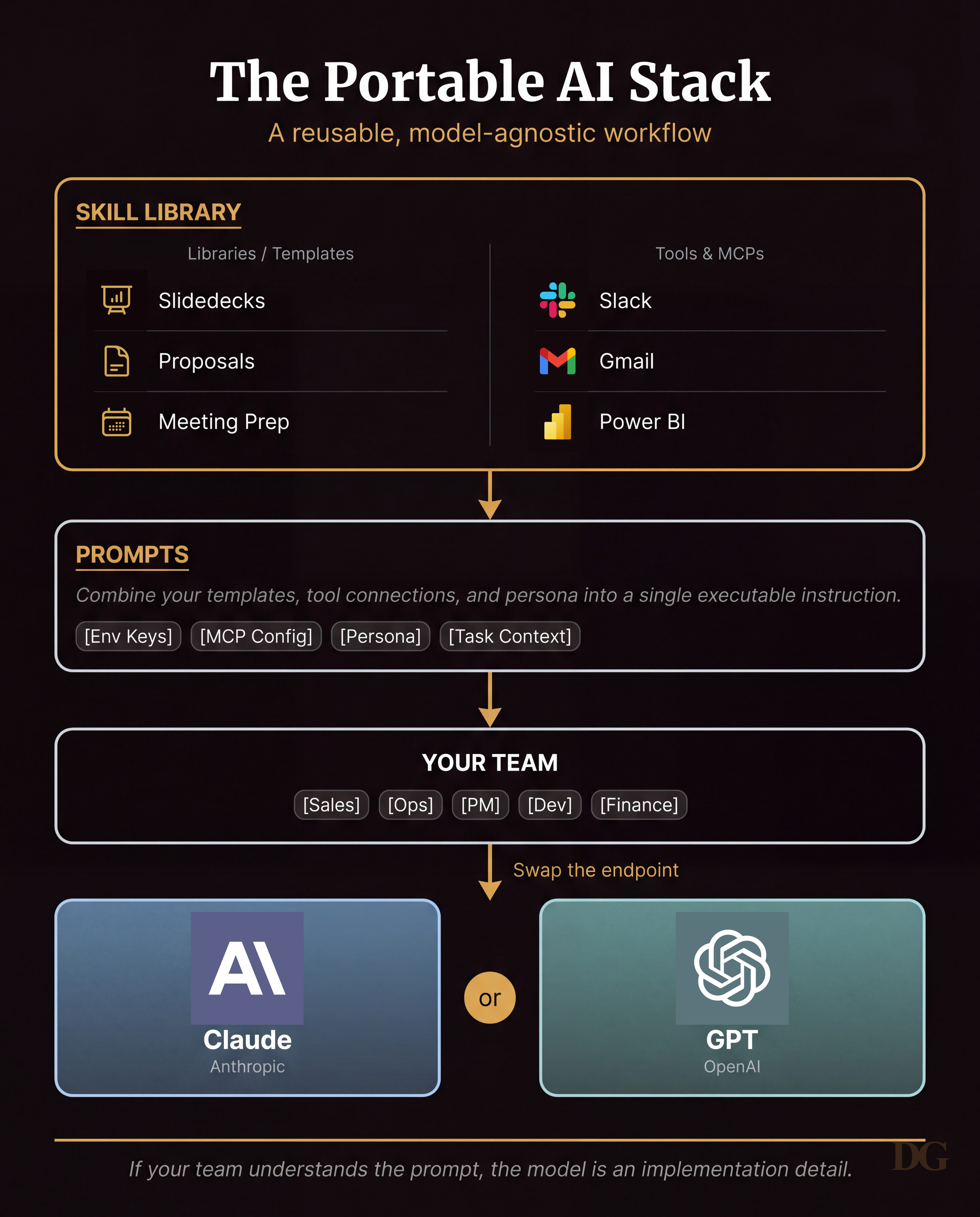
For non-technical teams this translates to a skill library. Your prompts, workflows, and templates live in a shared repo or document system. The team uses them directly. The model is a config setting. When Claude limits tighten or GPT pricing shifts, you change one line and the workflows keep running.
How to Build One
A skill library does not require engineering resources. The minimum version is a shared folder with three things: a prompts directory, a templates directory, and a tools config file that lists which MCPs or integrations are active.
Prompts are the executable layer. Each one should include the task description, the persona the model should apply, the tools or data it has access to, and the output format expected. When those four components are explicit and documented, swapping the underlying model is a one-line change. When they live implicitly in someone's head or chat history, you are starting over every time the provider changes anything.
Templates are the content layer. Slidedeck structures, proposal frameworks, meeting prep formats. These travel with you regardless of which API you are pointing at.
The tools config is where integrations live: which MCPs are wired up, which env keys are active, which Slack or Gmail or CRM connections the team is using. Keeping this explicit means onboarding a new team member is a setup script, and migrating a workflow to a different model is a config edit.
The Distill Loop
The version of this I use personally goes one step further. I run a distill command at the end of sessions that surfaces what Claude learned about how I work and asks me to approve or reject each item before anything gets saved. Approved learnings commit to a git repo. A setup script installs them wherever I need them. The model never starts from scratch, and the knowledge is portable across machines, providers, and collaborators.
This applies whether you are an individual or a team of fifty: your workflows need to survive a provider change. The last two months were a stress test for that. The teams that came through it had written down what they were doing.